A real story first.
A 180-page affiliate site had been stuck at 12,000 monthly visitors for over a year. The owner had tried new content, better keyword research, outreach for backlinks — nothing moved the needle. Then an SEO audit found 47 orphan pages and a homepage with 200+ outbound links diluting every link signal the site had built.
The fix? No new content. No new backlinks. Just WordPress internal linking restructured across the existing pages — cluster pages connected to pillar pages, orphan pages given contextual links, homepage links reduced and targeted.
Ninety days later: 31,000 monthly visitors. Same content. Same domain.
That is the power of WordPress internal linking done properly — and it is the most controllable SEO lever available to any WordPress site owner. Unlike backlinks, you do not need to ask anyone. Unlike content, it does not require weeks to produce. You can improve your internal linking today and see measurable changes in Google Search Console within two to four weeks.
This guide covers everything: what WordPress internal linking actually does for your rankings, the specific mistakes that are holding most WordPress sites back, and a complete step-by-step strategy to implement it correctly.
What WordPress Internal Linking Actually Does to Your Rankings
Most explanations of internal linking describe it as “helping Google understand your site structure.” That is true but incomplete. Here is what is actually happening at a technical level — because understanding the mechanism makes the strategy obvious.
Google assigns every page on your site an importance score based on how many pages link to it. This is a direct descendant of the original PageRank algorithm, and it still works. Every internal link from one page to another transfers a portion of that importance score. A page that receives internal links from 20 other posts on your site is, in Google’s model, more important than a page that receives links from 2 posts — even if both have identical external backlinks.
This matters for WordPress internal linking in three specific ways.
First, your most important pages — the ones you want ranking on page one — should be receiving the most internal links from the rest of your site. If your homepage has 200 links going out but your best pillar post only has 3 coming in, you are not distributing authority where it matters.
Second, Google uses internal linking patterns to understand topical relationships. When your post about WordPress speed optimization links to your post about LCP, and that post links back to the speed post, you are signalling to Google that these pages are part of the same topic cluster. Google’s entity-based ranking system uses these relationships to understand what your site is authoritative about — and rewards sites that demonstrate deep, connected expertise over a topic.
Third, Googlebot follows links to discover pages. A page that has zero internal links pointing to it — an orphan page — may only be discovered through your sitemap, and will be crawled infrequently. A page that is linked from 10 recent posts will be discovered and re-crawled far more often. This connects internal linking directly to your crawl budget and indexing speed.
The 6 WordPress Internal Linking Mistakes Killing Your Rankings
Before building a new internal linking strategy, it is worth auditing your current state. These are the most common WordPress internal linking errors — and most sites have at least three of them.
🔴 Orphan Pages
Pages with zero internal links. Googlebot may never find them through crawling. They exist on your site but are invisible to your link equity distribution entirely.
🔴 Random Anchor Text
“Click here,” “read more,” “this post” — vague anchor text tells Google nothing about the destination page. Keyword-rich anchors are a direct ranking signal for the target page.
🟡 No Pillar Structure
Publishing posts in isolation with no strategic connections. Every post is an island. Google sees no topical depth — just a collection of unrelated articles.
🟡 Links Only in Related Posts
Relying entirely on “Related Posts” widgets at the bottom of every page. Footer and sidebar links carry significantly less SEO weight than contextual links placed within the content body.
🔵 Linking to Noindexed Pages
Navigation and internal links pointing to tag archives, category pages, or admin URLs that are noindexed. Link equity flowing to pages that will never rank is pure waste.
🟣 Redirect Chains
Internal links pointing to URLs that redirect to another URL. Every redirect hop loses link equity and wastes crawl time. Links should always point to the final destination URL.

Step 1: Audit Your Current WordPress Internal Linking
You cannot improve what you have not measured. Before adding a single link, spend 20 minutes understanding your current WordPress internal linking state. Here is the fastest audit process using only free tools:
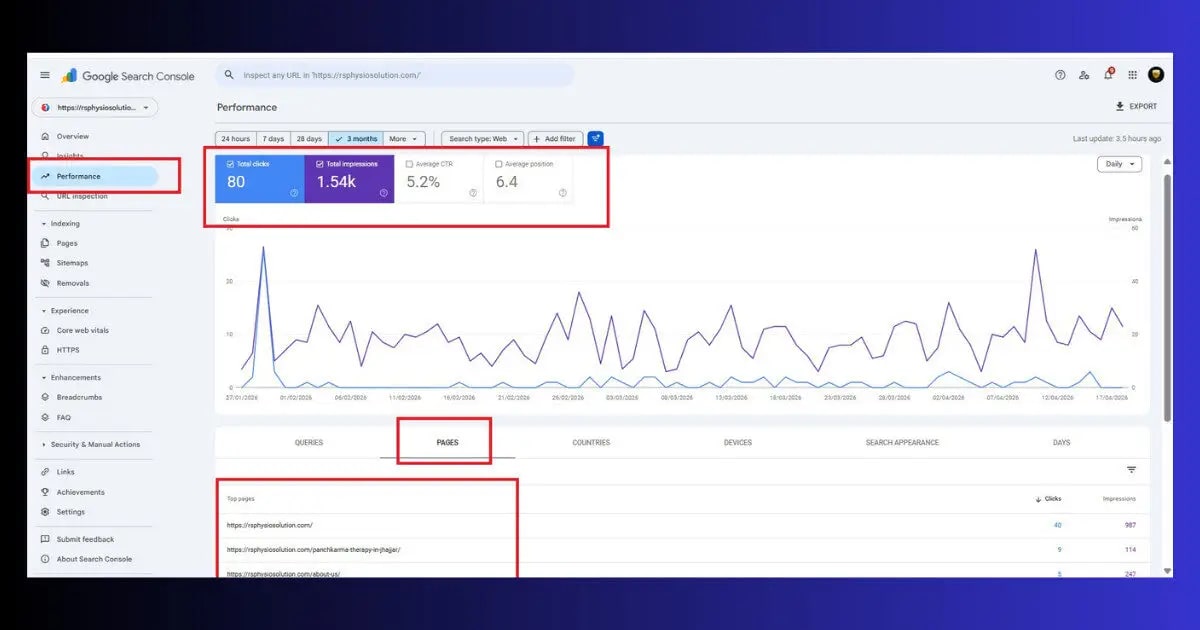
Google Search Console — Links Report
- Open Google Search Console → Links (left sidebar)
- Under “Internal links” — click “More”
- You will see a list of your pages ranked by how many internal links they receive
- Sort by “Incoming links” — your homepage will likely be at the top. Look at pages 5–20 in the list — are these your most important content pages? Or are random posts getting more links than your pillar content?
- Export this list — it becomes your baseline. Any important page with fewer than 5 incoming internal links needs attention first.
Find Orphan Pages
- In the same GSC Links report — scroll through the full list
- Any page that does not appear in the internal links list at all is an orphan — it has zero internal links pointing to it
- Cross-reference with your sitemap: if a page is in your sitemap but not in the GSC internal links report, it is an orphan
- Note every orphan page — fixing these is the highest-priority first step in any WordPress internal linking audit

Step 2: Build Your Pillar and Cluster Structure
The most effective WordPress internal linking strategy is not about adding random links everywhere. It is about building a deliberate hub-and-spoke architecture where your most important pages are at the centre of your link structure.
Here is how to think about it for a WordPress-focused site like ToolXray:
| Content Type | Role in Internal Linking | Example |
|---|---|---|
| Pillar Page | Receives links from many cluster pages. Your most important, comprehensive page on a broad topic. | Complete Technical SEO Audit Guide |
| Cluster Page | Covers a specific subtopic. Links to the pillar and to other relevant clusters. Receives links from related clusters. | WordPress XML Sitemap Not Working |
| Supporting Post | Detailed, specific post. Links up to cluster and pillar. Does not need many inbound links to perform well. | WordPress 404 Error Fix |
| Tool / Landing Page | Receives links from all content that’s relevant. Never or rarely links out to blog posts. | toolxray.com/seo-audit-tool/ |
For ToolXray specifically, a clean internal linking cluster looks like this:
Pillar: Complete Technical SEO Audit → receives links from every technical SEO cluster post
Clusters linking to it: WordPress Crawl Budget, WordPress Duplicate Content, WordPress XML Sitemap Not Working, WordPress Permalink Settings, Advanced Schema Markup, Technical SEO for Beginners
All clusters cross-link where relevant — and all link to the ToolXray audit tool at the end
This is exactly how Google’s entity-based ranking works in 2026. Your site is not just a collection of posts — it is an interconnected knowledge base about technical WordPress SEO. The internal linking structure makes that explicit.

Step 3: Add Contextual Internal Links — The Right Way
Contextual links — links placed within the body of your content, not in sidebars or footers — carry the most SEO weight. Google’s systems treat a link placed in the main content area as an editorial endorsement of the destination page. A link in a footer template is treated as navigation. The difference matters for how much link equity transfers.
Anchor Text Rules
Anchor text is the clickable text of an internal link. It is one of the strongest signals you can send Google about what the destination page should rank for. For WordPress internal linking, follow these rules:
- Use descriptive, keyword-rich anchor text: Instead of “click here to learn more about site speed,” write “read the complete WordPress speed optimization guide.” The anchor text “WordPress speed optimization guide” directly tells Google what the destination page is about.
- Use natural variations: Do not use the exact same anchor text every time you link to the same page. “WordPress speed guide,” “how to speed up WordPress,” and “WordPress speed optimization” are all valid. Variety looks natural and covers more keyword variations for the destination page.
- Never use generic anchors for important links: “Click here,” “read more,” “this article,” “here” — these pass zero topical signal. Every internal link to an important page should have an anchor that describes that page’s topic.
- Do not over-optimize: If every single link to a page uses the exact same keyword-stuffed anchor text, it can look manipulative. Aim for natural variation that a real writer would produce.

How Many Internal Links Per Post?
There is no single correct number, but a practical guideline for WordPress internal linking is 3–5 contextual links per 1,000 words of content. A 3,000-word post should naturally have 9–15 internal links placed within the content — not forced, but genuinely relevant links that add value for the reader.
Step 4: Fix Orphan Pages
An orphan page is the most damaging WordPress internal linking problem because it is invisible. You published the post, you submitted the sitemap, but no other page on your site links to it. Googlebot discovers it through the sitemap and crawls it occasionally — but it receives no link equity from the rest of your site, no topical context signal, and no crawl priority signal.
Fixing orphan pages is the fastest way to see measurable improvements in your internal linking health:
- List all orphan pages using the GSC audit from Step 1
- For each orphan — identify 2–3 existing published posts on related topics
- Edit each of those existing posts — find a natural place in the content where a link to the orphan post would genuinely add value for the reader
- Add the contextual link with descriptive anchor text
- Update the post — WordPress will timestamp the update, which also signals freshness to Google
- Track in GSC Links report — within 3–4 weeks the orphan page should appear in the internal links report with at least 2–3 incoming links
Step 5: Use RankMath’s Internal Link Suggestions
RankMath includes a powerful feature specifically for WordPress internal linking that most users never turn on. The Link Suggestions panel in the Gutenberg editor analyses your content as you write and suggests relevant internal links from your existing published posts.
- Open any post in the Gutenberg editor
- Look for the RankMath SEO panel in the right sidebar
- Click the “General” tab — scroll down to “Link Suggestions”
- RankMath will show a list of relevant existing posts that you could link to from this content
- Click “Add Link” next to any suggestion to insert the link at your cursor position
- Review and adjust the anchor text — RankMath auto-inserts the post title as anchor text, which is usually acceptable but you can refine it
This feature transforms WordPress internal linking from a manual research task into a quick review process. It does not replace judgment — you still need to evaluate whether each suggested link genuinely adds value at that point in the content — but it surfaces opportunities you would otherwise miss.
Step 6: Handle Link Depth — Keep Important Pages Close to the Surface
Link depth is the number of clicks required to reach a page from your homepage. Research consistently shows that pages more than 3 clicks deep from the homepage receive 70% less crawl frequency than pages within 1–2 clicks. For a site where you want important content indexed and ranking, deep burial is a serious problem.
For WordPress internal linking, managing link depth means:
- Your homepage should link directly to your pillar pages: Either in the navigation, in a featured posts section, or in a resource section in the footer. Pillar pages at 1 click from homepage = maximum crawl priority.
- Pillar pages should link to cluster posts: Any post that is important enough to be part of a cluster should be within 2 clicks of the homepage. Pillar → Cluster = 2 clicks. That is the target.
- Never let important posts go beyond 3 clicks deep: If a post requires navigating through 4+ pages to reach from the homepage, it needs direct links from pages that are higher in the hierarchy.
- Check depth after major site restructuring: Adding new categories, changing permalink structures, or reorganising navigation can inadvertently bury pages that were previously accessible. Run an audit whenever you make structural changes.
Want your internal linking improvements indexed faster?
Hostinger Business and Cloud plans use LiteSpeed servers with built-in caching — faster TTFB means Googlebot processes more pages per session, so your internal linking changes get discovered and reflected in rankings faster.
Step 7: Maintain Internal Linking as You Publish
A one-time WordPress internal linking audit is not enough. As you publish new content, your internal linking structure naturally develops gaps — new posts with no inbound links, old pillar pages that have not been updated with links to new relevant cluster posts, growing topic clusters that need the pillar post updated to reflect new entries.
The practical system that works for ongoing internal linking maintenance:
- New post checklist: Before publishing any new post, add 3–5 contextual links from the new post to relevant existing posts. After publishing, update 3–5 existing posts to link back to the new post. Two-way linking strengthens semantic clarity for Google — both pages signal their topical relationship to each other.
- Monthly GSC Links audit: Once a month, open the GSC Links report and check the distribution. Any important page that has lost ground in the internal links count (because the site has grown but the page has not received new links) needs attention.
- Quarterly full orphan check: As your content library grows, new orphans are created. A quarterly check of the GSC Links report against your sitemap catches them early before they spend months without link equity.
- Update old posts with links to new ones: Every time you publish a new pillar or cluster post, go back to the 5 most relevant existing posts and add a contextual link to the new piece. This is the most underrated habit in WordPress internal linking — old posts with existing rankings passing authority to new ones gives new content a significant early boost.
ToolXray Free WordPress Technical Audit
Check your site’s technical health including broken links, redirect chains, Core Web Vitals and 80+ SEO signals — free scan, no signup required.
WordPress Internal Linking — Complete Action Checklist
- Audit current state: GSC → Links → Internal links — export and identify your 10 most important pages and how many internal links each receives.
- List all orphan pages and prioritise fixing them first — 2–3 contextual inbound links per orphan page is the minimum target.
- Map your pillar and cluster structure — identify 2–3 pillar pages and which existing posts belong in each cluster.
- Update pillar pages to include links to all relevant cluster posts — pillar pages should actively reference the cluster content they are the hub for.
- Update cluster posts to all link back to the pillar — every cluster post should have at least one contextual link pointing to its pillar page.
- Audit anchor text on your most important links — replace all “click here” and “read more” anchors with descriptive keyword-rich alternatives.
- Check for redirect chains: Any internal link pointing to a URL that then redirects to another URL — update to point directly to the final destination.
- Check link depth — your pillar pages should be within 1–2 clicks of your homepage. Important cluster posts within 3 clicks maximum.
- Enable RankMath Link Suggestions and use it on every new post you write going forward.
- Implement the “publish and link back” rule — after every new post, update 3–5 existing posts to link to it with descriptive anchor text.
- Remove or update links to noindexed pages — particularly links to tag archives and category pages in your main navigation if those pages are noindexed.
- Monthly GSC Links check — track the internal link distribution across your most important pages over time.
The Bottom Line
Of all the SEO improvements available to a WordPress site owner in 2026, WordPress internal linking sits in a unique position: it is entirely within your control, it costs nothing, and the results are measurable within weeks rather than months. No new content required. No outreach. No tools beyond the free ones already at your disposal.
The sites that rank fastest and most consistently are not always the ones with the best content or the most backlinks. They are the ones where the content that exists is connected in a way that makes Google’s job easy — clear pillar pages, well-connected cluster posts, no orphaned content, no link equity bleeding into noindexed pages, and a link depth structure that keeps important pages close to the surface where Googlebot can find them quickly.
Start with the GSC Links audit. Fix your orphan pages. Build your pillar and cluster structure. Then make the “publish and link back” habit automatic for every new post. The WordPress internal linking compounding effect is real — and it is one of the most reliable free SEO improvements available.
🔍 Free WordPress Technical Audit
Check broken links, redirect chains, Core Web Vitals, PageSpeed and 80+ SEO signals — free, no signup
Run Free Audit at ToolXray →Related Articles
Complete Technical SEO Audit
Internal linking is one of 80+ signals in a full technical audit. Run the complete check after fixing your link structure.
WordPress Crawl Budget Guide
Internal links direct Googlebot to important pages. Fix crawl budget alongside internal linking for maximum indexing speed.
WordPress Duplicate Content Fix
Ensure your internal links point to canonical URLs — not duplicate versions that split your link equity.
WordPress XML Sitemap Not Working
Internal links and sitemaps work together for discovery. Fix sitemap issues so Googlebot can find every page you link to.
WordPress Permalink Settings
Clean permalink structure ensures your internal links always point to the right, stable URLs without redirect overhead.
Advanced Schema Markup Guide
After building strong internal linking, schema markup is the next layer that helps Google understand your content relationships.